

10 Best Cybersecurity Software Reviewed for 2026

Best Cybersecurity Software Shortlist


The best cybersecurity software helps you detect threats early, block unauthorized access, and protect sensitive data across endpoints, networks, and cloud environments.
If you’ve dealt with agents that bog down system performance, alerts that flood your inbox without context, or tools that don’t work well together, you know how frustrating it is to piece together a reliable security posture. Many teams also run into problems with visibility, especially when supporting hybrid or remote environments, or trying to layer protection across legacy infrastructure.
I’ve tested and implemented dozens of cybersecurity tools in enterprise and SaaS environments, working closely with teams to secure everything from endpoints to cloud-based services. This guide breaks down the platforms that offer clean integrations, meaningful alerting, and the visibility you need to respond quickly without getting buried in noise.
Why Trust Our Software Reviews
We’ve been testing and reviewing software since 2023. As tech leaders ourselves, we know how critical and difficult it is to make the right decision when selecting software.
We invest in deep research to help our audience make better software purchasing decisions. We’ve tested more than 2,000 tools for different tech use cases and written over 1,000 comprehensive software reviews. Learn how we stay transparent & our software review methodology.
Best Cybersecurity Software Summary
| Tool | Best For | Trial Info | Price | ||
|---|---|---|---|---|---|
| 1 | Best for ITOps teams | Free demo available | Pricing upon request | Website | |
| 2 | Best for DNS-level threat blocking | 14-day free trial + free demo available | From $7/user/month (billed annually) | Website | |
| 3 | Best for real-time behavioral detection | 30-day free trial + free demo available | Pricing upon request | Website | |
| 4 | Best for securing applications | 15-day free trial | From $7/host/month | Website | |
| 5 | Best for educational institutions | Free plan + 14-day free trial available | From $15/host/month (billed annually) | Website | |
| 6 | Best for compliance-focused TPRM programs | Free demo available | Pricing upon request | Website | |
| 7 | Best for Google Workspace and Microsoft 365 | Free demo available | From $4/user/month (billed annually) | Website | |
| 8 | Best for integrated DLP and CASB capabilities | Free demo available | Pricing upon request | Website | |
| 9 | Best for AI-driven auto-triage | Free plan available | From $34/developer/month | Website | |
| 10 | Best for company-wide password policies | Free plan available | From $1.79/user/month | Website |

Best Cybersecurity Software Reviews
Below are my picks for the best cybersecurity software with brief but detailed rundowns to help you compare their strengths, weaknesses, and pricing:

Best for ITOps teams

CrowdStrike Falcon is a cloud-based security platform that analyzes networks for malware and similar threats.
Why I picked CrowdStrike Falcon: The CrowdStrike Falcon Discover feature scanned my network and identified applications, users, and devices that didn’t meet compliance standards. ITOps teams in charge of IT infrastructure can also choose higher product tiers for advanced capabilities like automated threat intelligence and managed threat-hunting services.
CrowdStrike Falcon standout features and integrations:
Features that make CrowdStrike Falcon ideal for ITOps include Falcon Spotlight, which boosts visibility across your systems so you can pinpoint and address vulnerabilities across endpoints. You can also use Falcon Forensics to collect cybersecurity incident data for analysis so you can strengthen your systems against future attacks.
Integrations are pre-built for AWS CloudTrail, Google Chronicle, Darktrace, Coralogix, and IBM Security Verify.
Pros and Cons
Pros:
- Easy setup process
- Works with extended internet of things (XIoT) systems
- Provides strong ITOps-specific tools
Cons:
- Visit WebsiteOpens new window
- Occasional conflict with other anti-malware tools
- UI takes a while to get used to

Best for DNS-level threat blocking

NordLayer is a network security platform designed for businesses that need to secure remote access, protect sensitive data, and manage user permissions across distributed teams.
Who Is NordLayer Best For?
NordLayer is a good fit for IT teams in mid-sized businesses that need centralized control over network access and security across remote or hybrid workforces.
Why I Picked NordLayer
I picked NordLayer as one of the best because its DNS filtering goes well beyond a basic blocklist. It uses patented, AI-powered technology that continuously updates its threat database using machine learning—so when a new malicious domain surfaces, my team doesn't have to wait for a manual update to stay protected. In practice, that means phishing links in emails get blocked at the DNS level before a page even loads. I also like the category-based filtering, which lets me block over 50 content categories—malware, cryptojacking, phishing, and more—from a single control panel across the entire organization.
NordLayer Key Features
- Device posture security: Evaluates devices against your defined security rules and automatically restricts network access for non-compliant devices.
- Cloud firewall: Applies granular network segmentation across hybrid infrastructure, controlling traffic between users, servers, and cloud resources.
- Dedicated IP with allowlisting: Assigns a fixed IP address to your organization so you can restrict resource access to verified addresses only.
- Virtual private gateways: Creates organization-specific VPN gateways with layered security policies for controlling access to internal resources.
NordLayer Integrations
Integrations include Okta, Google Workspace, JumpCloud, Entra ID, OneLogin, AWS, Google Cloud, IBM Cloud, Jamf Cloud, and SentinelOne.
Pros and Cons
Pros:
- Security measures like AES-256 encryption and multi-factor authentication
- Extensive access control and session monitoring
- Utilizes a zero-trust framework
Cons:
- Server setup can be complex
- Number of available server locations could be expanded
New Product Updates from NordLayer
NordLayer Adds Dynamic IP Support for Sites
NordLayer Sites now support remote locations without a static public IP, letting admins use 0.0.0.0 where needed for simpler configuration. This makes site-to-site connectivity easier for branches using broadband, LTE, or other dynamic connections. For more information, visit NordLayer’s official site.
 .
.
Radware
Best for real-time behavioral detection

Radware helps security teams and enterprises protect web applications and APIs from automated threats, offering advanced bot management and real-time attack mitigation for organizations facing evolving cybersecurity risks.
Who Is Radware Best For?
Radware is a strong fit for mid-to-large enterprises running high-traffic web applications that need dedicated protection against sophisticated bot attacks and API abuse.
Why I Picked Radware
Radware earns its spot on my shortlist because of how it handles real-time behavioral detection—something most bot management tools still struggle to do without generating excessive false positives. I like that it uses proprietary AI-based behavioral algorithms that analyze traffic and generate attack signatures in real time, so my team doesn't have to wait for manual rule updates to block new threats. The auto cross-module correlation feature is particularly useful: it cross-references signals across security modules to preemptively block malicious sources before they even reach the application layer. The CAPTCHA-less crypto challenge means legitimate users don't get caught in the crossfire when a bot attack is actively being mitigated.
Radware Key Features
- Advanced detection modules: Identifies sophisticated bots that manipulate IPs and identities, uncovers distributed bot attacks, and detects CAPTCHA farm services.
- AI crawler visibility and management: Classifies AI crawler traffic by intent and gives you granular controls to manage which crawlers can access your content.
- Native mobile app protection: Uses integrated device authentication for iOS and Android to verify devices and validate requests before bot attacks materialize.
- Transparent reporting and analytics: Delivers granular bot classification with clean dashboards and detailed reports so you can see exactly what traffic is hitting your applications.
Radware Integrations
Integrations include Amazon CloudFront, Akamai, Fastly, Cloudflare, F5, Citrix, Imperva, Microsoft Azure, AWS, and Google Cloud Platform.
Pros and Cons
Pros:
- Strong integration with SIEM tools
- Comprehensive traffic analytics reporting
- Accurate AI-based bot detection
Cons:
- Interface could be more intuitive
- Limited pricing transparency available
Best for securing applications
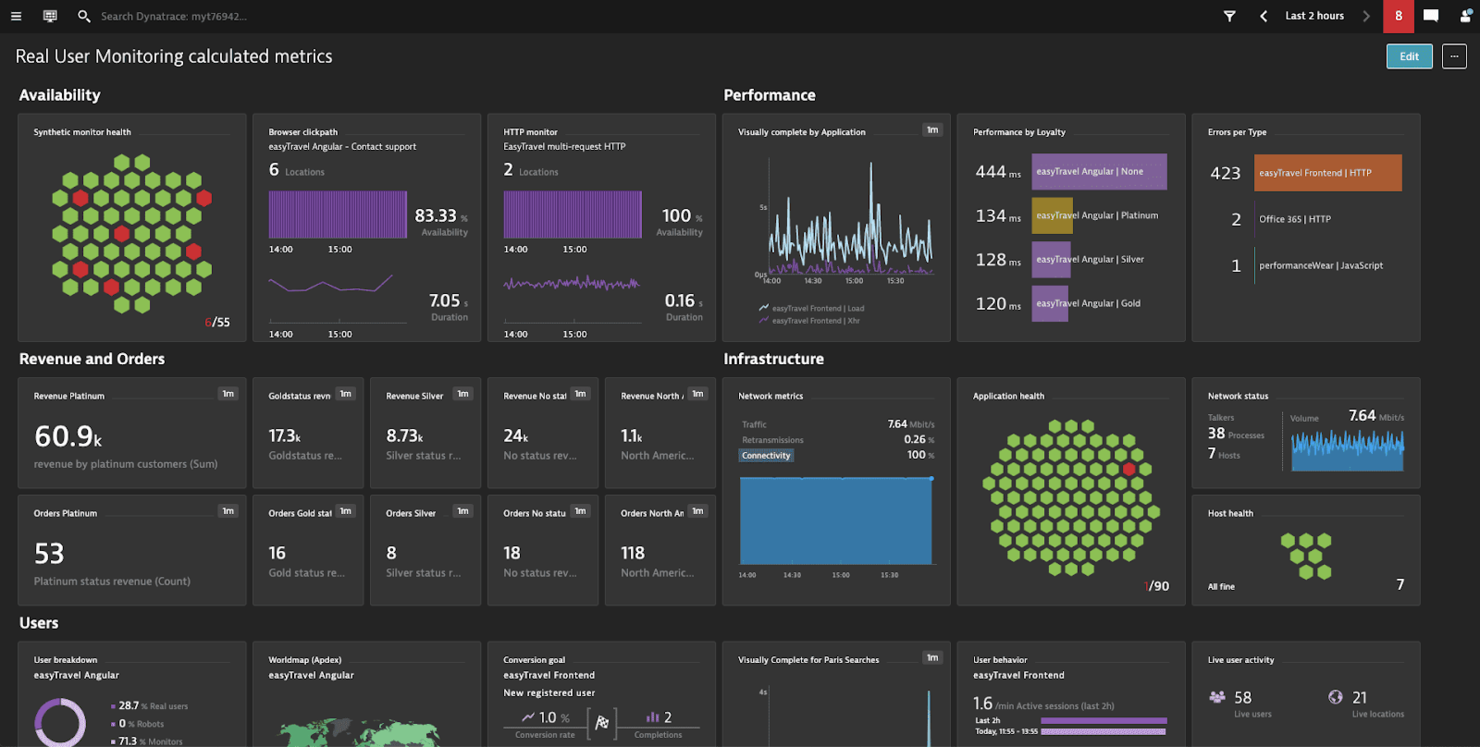
Dynatrace is a cloud-based monitoring, observability, automation, and analytics solution for systems such as infrastructure and applications.
Why I picked Dynatrace: One of Dynatrace’s main offerings is its application performance monitoring (APM) solution, whose security features I tested. Whenever it found an issue, it sent me a single concise notification with actionable information that identified the root cause down to the exact line of code.
Dynatrace standout features and integrations:
Features that made me like Dynatrace’s APM tools include the automatic detection of all application dependencies and extending its scope, something I believe is useful for large complex systems or those that rely on microservices. It also provides usage metrics from both synthetic and real users to increase the pool of information you have for making decisions that affect performance and security.
Integrations are pre-built for GitLab, Google Cloud, AWS, Azure, Jenkins, Docker, Kubernetes, JFrog, PagerDuty, and LaunchDarkly.
Pros and Cons
Pros:
- Easy to deploy
- Makes debugging easier
- Robust application monitoring features
Cons:
- Only practical for enterprise applications
- Customer support is unresponsive at times
Datadog
Best for educational institutions
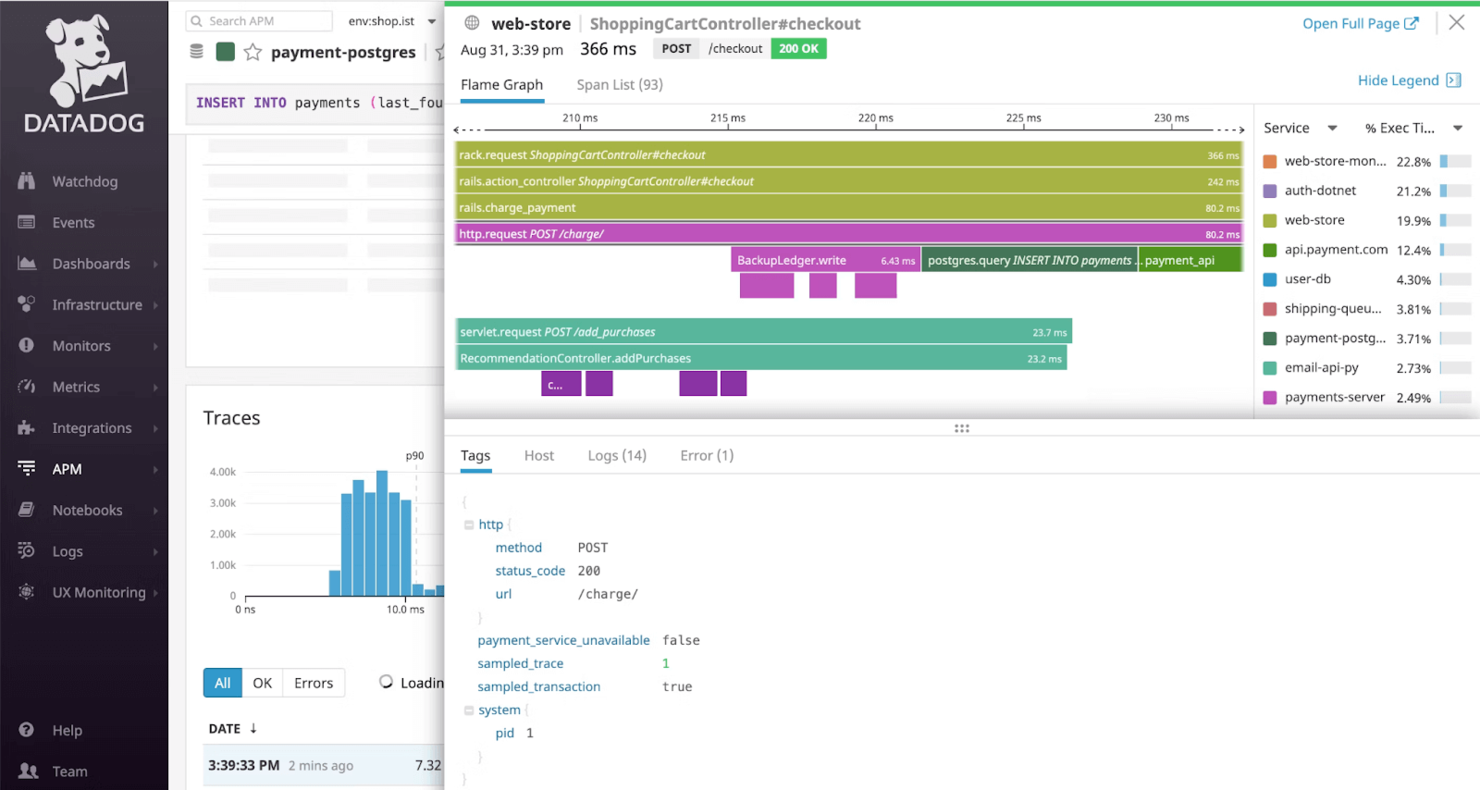
Datadog is a cloud monitoring platform that provides observability across systems such as infrastructure, applications, and digital experiences.
Why I picked Datadog: I chose Datadog because its infrastructure monitoring platform makes it easy to comply with the security standards, including those imposed on educational institutions, as well as in health and financial sectors. On top of the platform’s SOC 2 Type II certification, you can also implement TLS and HTTP Strict Transport Security (HSTS).
Datadog standout features and integrations:
Features I found while testing Datadog include the sensitive data scanner that combs through logs to identify, classify, and protect sensitive information. This could be great for any organization that needs to safeguard sensitive personal data, such as educational institutions responsible for student records. Datadog can also monitor portals and e-learning platforms, with real-time insights that you can act on to keep emerging threats at bay.
Integrations are pre-built for Adobe Experience Manager, AWS CloudTrail, Auth0, Google Workspace, OneLogin, Meraki, Sophos, Okta, Slack, Microsoft 365, and JFrog.
Pros and Cons
Pros:
- Provides a unified monitoring solution
- Beginner-friendly UI and dashboards
- Large integration library
Cons:
- Complex setup on private hardware
- Can get expensive if usage isn’t monitored

Best for compliance-focused TPRM programs

Prevalent helps IT, risk, and compliance teams in regulated industries automate third-party risk management and vendor security assessments to address evolving cybersecurity and compliance demands.
Who Is Prevalent Best For?
Prevalent is a strong fit for mid-to-large enterprises in regulated industries like finance, healthcare, and government that need structured vendor risk oversight.
Why I Picked Prevalent
I picked Prevalent as one of the best because of how well it handles the compliance side of TPRM—something a lot of vendor risk tools treat as an afterthought. What I find most useful is the library of 750+ pre-built assessment templates mapped to frameworks like NIST CSF, ISO 27001, HIPAA, and GDPR. Instead of building questionnaires from scratch, my team can launch a compliance-aligned vendor assessment in minutes. I also like the audit-ready reporting, which pulls together vendor responses, risk scores, and remediation status into a format regulators and auditors actually want to see—no manual compiling required.
Prevalent Key Features
- Inherent risk scoring: Automatically tiers and categorizes vendors by calculating inherent and residual risk scores based on the likelihood and impact of security, compliance, and operational incidents.
- Continuous monitoring: Tracks vendor cyber threats, financial problems, regulatory findings, and reputational concerns in real time across 500k+ external sources.
- Vendor offboarding automation: Automates contract assessments and offboarding procedures to reduce post-contract exposure when ending vendor relationships.
- Risk analytics and dashboards: Customizable dashboards and reporting let you visualize risk trends and build executive-ready reports for stakeholder communication.
Prevalent Integrations
Integrations include ServiceNow, BitSight, SecZetta, Source Defense, RiskRecon, SecurityScorecard, Rapid7, Tenable, Qualys, and Microsoft Azure.
Pros and Cons
Pros:
- Strong security protocols to protect data
- Users can tailor reports according to specific needs
- Extensive functionalities for managing vendor risk
Cons:
- Challenges in migrating data can complicate the initial setup
- The platform is complex and comes with a learning curve

Best for Google Workspace and Microsoft 365

Material Security helps IT and security teams protect cloud email and collaboration platforms from phishing, account compromise, and data loss, offering advanced controls and incident response tools designed for organizations using Google Workspace or Microsoft 365.
Who Is Material Security Best For?
Material Security is a good fit for mid-size to enterprise security teams that rely on Google Workspace or Microsoft 365 as their primary collaboration environment.
Why I Picked Material Security
Material Security earns its spot on my shortlist because of how deeply it integrates with Google Workspace and Microsoft 365 to protect email at the data layer, not just the perimeter. I like that it can retroactively remediate threats already sitting in inboxes—something most email security tools can't do after delivery. My team also uses its data protection controls to restrict access to sensitive messages based on identity verification, which adds a meaningful layer of defense against account takeover. The phishing "herd immunity" feature is especially useful: when one user reports a threat, Material Security scans and remediates that message across every inbox in the organization.
Material Security Key Features
- BEC and VEC detection: Identifies business email compromise and vendor email compromise attacks using behavioral analysis across email in Google Workspace and Microsoft 365.
- File security and sharing controls: Scans Google Drive and Microsoft 365 files to clean up overshared permissions and reduce sensitive data sprawl.
- Security posture management: Continuously monitors your Google Workspace and Microsoft 365 configurations to detect and remediate drift before it creates exploitable gaps.
- Shadow AI and third-party app controls: Gives visibility into unauthorized third-party app connections and OAuth grants across your cloud workspace.
Material Security Integrations
Integrations include Google Workspace and Microsoft 365.
Pros and Cons
Pros:
- Enables secure file sharing within email communications.
- Supports advanced threat protection for email accounts.
- Automates phishing response to improve response times.
Cons:
- Limited native integrations with other security tools.
- Dependency on cloud infrastructure may introduce latency issues.
Best for integrated DLP and CASB capabilities
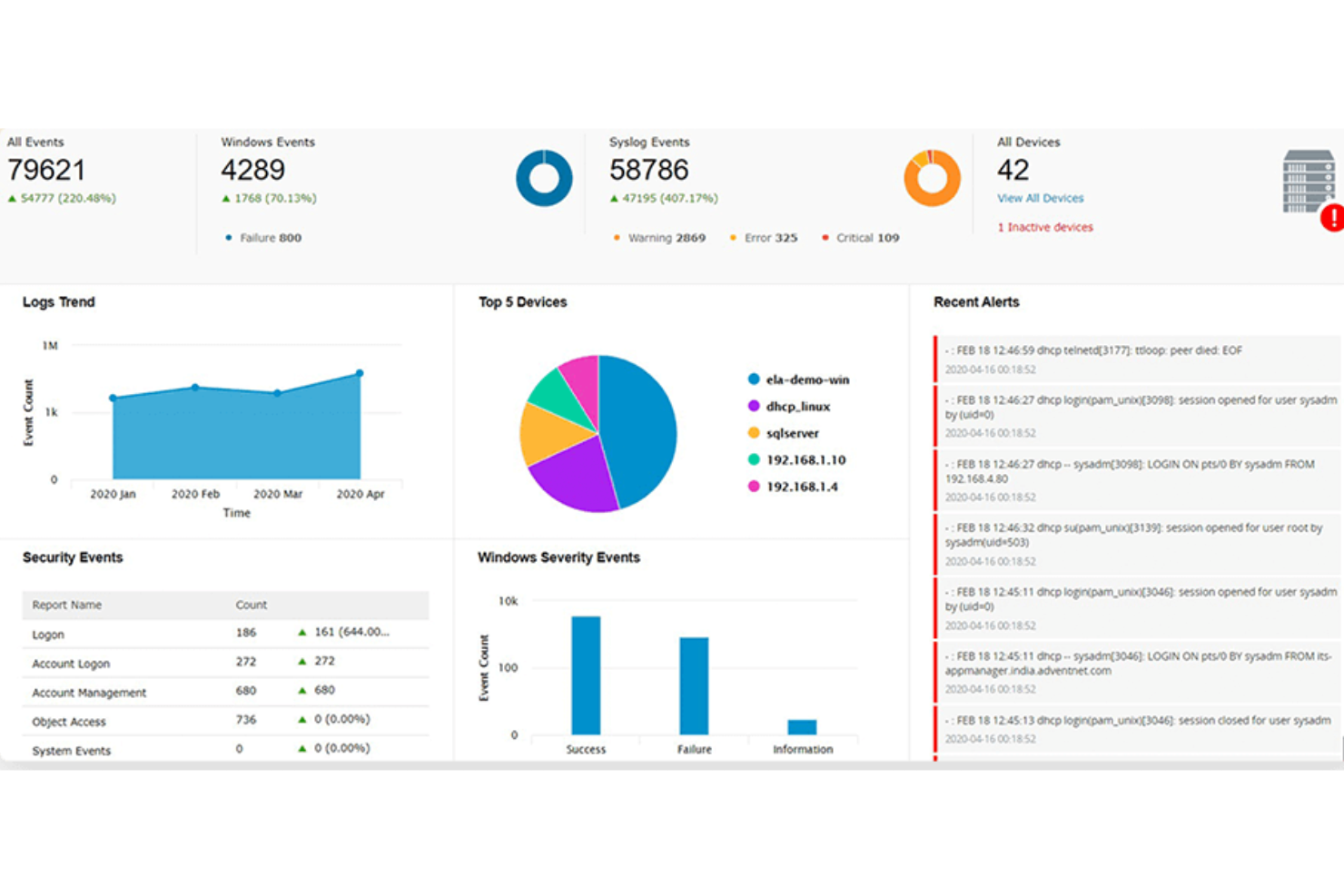
ManageEngine Log360 is a unified SIEM platform for IT teams and security professionals who need to monitor, detect, and respond to threats across on-premises and cloud environments while meeting compliance requirements.
Who Is ManageEngine Log360 Best For?
Log360 is a strong fit for mid-size to large enterprises with dedicated security operations teams managing complex, hybrid IT environments.
Why I Picked ManageEngine Log360
I picked ManageEngine Log360 as one of the best because of how it handles DLP and CASB as native, built-in capabilities rather than bolt-on add-ons. Most SIEM tools require you to integrate separate products to cover data protection and cloud visibility—with Log360, both are already there. The integrated DLP module includes content-aware protection and data risk assessment, so my team monitors access to sensitive files and identifies where critical data resides across the network. On the CASB side, shadow IT monitoring lets us spot unsanctioned cloud apps in use across the environment and track who's accessing them, which matters as SaaS sprawl increases.
ManageEngine Log360 Key Features
- UEBA: Detects anomalous user and entity behavior using machine learning to surface insider threats and compromised accounts.
- Real-time event correlation: Applies rule-based analysis across log data to identify attack patterns and trigger automated alerts.
- Compliance reporting: Generates pre-built audit reports mapped to frameworks like HIPAA, PCI DSS, GDPR, and SOX.
- Incident management: Lets your team assign, track, and resolve security incidents directly within the platform using a built-in ticketing workflow.
ManageEngine Log360 Integrations
Integrations include ServiceDesk Plus, Jira Service Desk, Kayako, Amazon Web Services (AWS), Microsoft Azure, Salesforce, Microsoft 365, Exchange Server, Active Directory, and databases like SQL Server.
Pros and Cons
Pros:
- Threat intelligence features
- Robust compliance management capabilities
- Real-time log collection and analysis
Cons:
- The tool requires regular maintenance and updates
- Setup and configuration process can be complex
New Product Updates from ManageEngine Log360
ManageEngine Log360 Adds New Log Source Integrations
ManageEngine Log360 adds new log source integrations for Bitdefender GravityZone, CrowdStrike Falcon Event Streams, Okta, and MikroTik to broaden security and network visibility. For more information, visit ManageEngine Log360's official site.
 .
.

Corgea is a cybersecurity platform for IT teams and security professionals who need to automate threat detection, incident triage, and response across complex digital environments.
Who Is Corgea Best For?
Corgea is a strong fit for security engineering teams at mid-size to enterprise companies that need to reduce manual triage workloads across high-volume vulnerability pipelines.
Why I Picked Corgea
I picked Corgea as one of the best because its AI-driven auto-triage directly addresses one of the most frustrating parts of application security work: alert fatigue from false positives. When my team runs scans across a large codebase, Corgea's auto-triage engine uses contextual code analysis to separate real exploitable findings from noise, cutting false positives by up to 3x compared to traditional static analysis tools. I also like that it goes beyond simple flagging—it traces real runtime paths from public-facing routes like
/login
all the way to vulnerable code or packages, so my team knows exactly what attackers can reach. That reachability mapping, combined with AI-generated fix suggestions with over 90% accuracy, means we're spending less time debating severity and more time closing out the backlog.
Corgea Key Features
- Dependency scanning (SCA): Identifies known vulnerabilities in third-party packages across 25+ programming languages, with CVE details and CVSS scores included.
- Infrastructure as code (IaC) scanning: Detects security misconfigurations in Kubernetes, Terraform, Docker, and CloudFormation files before deployment.
- Secrets detection: Scans codebases for hardcoded API keys, tokens, and credentials using pattern matching, entropy analysis, and AI-powered context analysis.
- PolicyIQ: Lets you define custom policies in natural language to tailor detection, triage, and fix behavior to your specific environment and security requirements.
Corgea Integrations
Integrations include GitHub, GitLab, Bitbucket, Azure DevOps, JIRA, Slack, CodeQL, Zapier, webhooks, and an API for custom integrations.
Pros and Cons
Pros:
- Business logic flaw detection
- Automatic secure code fixes
- AI-driven vulnerability detection
Cons:
- AppSec-focused, not full stack
- No runtime protection features

NordPass
Best for company-wide password policies

NordPass is a business password manager designed for IT teams and organizations that need to secure, manage, and control access to company credentials across their workforce.
Who Is NordPass Best For?
NordPass is a strong fit for IT administrators and security teams in mid-sized to large organizations that need centralized control over employee password practices.
Why I Picked NordPass
NordPass earns its spot on my shortlist because it handles company-wide password policy enforcement from a single admin panel. I like that admins can set security rules that apply automatically to all users, so admins don't have to rely on individual employees to follow best practices. The Security Dashboard gives my team a real-time view of password health across the organization, flagging weak or reused credentials against the policies we've set. The Activity Log tracks every credential access event, helping to spot unusual behavior without searching separate audit tools.
NordPass Key Features
- Built-in authenticator: Generates and stores TOTP codes alongside passwords, so your team manages credentials and MFA in one place.
- Shared folders: Organizes credentials, notes, and payment details into folders that can be shared across specific teams or groups.
- Data breach scanner: Monitors stored credentials against known breach databases and alerts you when compromised accounts are detected.
- Autofill and autosave: Automatically captures and fills login credentials across browsers and apps, reducing manual entry across devices.
NordPass Integrations
Integrations include Entra ID, MS ADFS, Okta, Google Workspace, Vanta, Microsoft Sentinel, and Splunk.
Pros and Cons
Pros:
- Centralized control through sharing hub
- Easy integrations with major ID providers
- Strong encryption with zero-knowledge policy
Cons:
- Offline access issues reported frequently
- Autofill functionality occasionally inconsistent
Other Cybersecurity Software
While I was making my evaluations, I found these tools that didn’t make the main list, but might still be a good choice for other use cases:
- NordStellar
For real-time threat alerts
- Zeropath
For context-aware code security
- Aikido Security
For code-to-cloud security
- Logmanager
For real-time log visibility
- Twingate
For secure remote network access
- ManageEngine Endpoint Central
For managing and securing IT infrastructure
- Heimdal
With DNS security and ransomware protection
- Malwarebytes
Rootkit scanner
- ESET PROTECT Complete
For proactive threat detection
- Astra Pentest
For continuous vulnerability detection
- New Relic
For full-stack observability
- NETSCOUT
DDoS protection features
- Zygon
For SaaS security posture management
- Norton
For secure VPN privacy
- Guardio
For proactive, real-time web security
- Sprinto
For companies in highly regulated industries
- Sophos
For small businesses
- Amazon CloudWatch
For AWS
- Azure Sphere
For IoT devices
- Microsoft Intune
For endpoint security


Related Software and Tool Reviews
If you still haven't found what you're looking for here, check out these other types of tools that we've tested and evaluated.
- Network Monitoring Software
- Server Monitoring Software
- SD-Wan Solutions
- Infrastructure Monitoring Tools
- Packet Sniffer
- Application Monitoring Tools
How I Evaluate Cybersecurity Software
Whether you're correlating SIEM alerts or containing an endpoint breach, I split evaluation into two layers: the baseline every tool must meet and the differentiators that separate the best.
Core Functionality (Table Stakes For This List)
When I'm selecting tools for my list, I rank each one on a scale from 0 (does not offer the functionality) to 5 (excels in this area) for each core functionality listed below. Then, I calculate the tool's total score into a percentage. Each tool needs to achieve a minimum total score of 75% to be considered for inclusion.
- Threat Detection & Response: I evaluate whether the platform catches real-world attack patterns—like lateral movement, credential stuffing, or ransomware propagation—and offers guided or automated response actions.
- Vulnerability Management: Each tool should surface weaknesses across endpoints, cloud workloads, and applications, with risk-based prioritization that helps teams fix what matters first.
- Access & Identity Controls: I check for MFA, RBAC, and SSO support, along with how granularly teams can enforce least-privilege access across admin consoles and protected resources.
- Data Protection & Encryption: Encryption at rest and in transit is table stakes, but I also look at DLP capabilities—like detecting sensitive data in outbound emails or cloud storage buckets.
- Security Monitoring & Logging: I look for centralized log aggregation from multiple sources (firewalls, endpoints, cloud providers) with correlation, search, and alerting that supports real incident investigation.
- Compliance & Reporting: Tools should include prebuilt report templates mapped to frameworks like SOC 2, HIPAA, or ISO 27001, so your team can pull audit-ready evidence without manual assembly.
Once I have a list of tools that meet the criteria, I consider what sets each platform apart.
Differentiating Factors (What Sets Vendors Apart)
Here's how I compare and contrast different vendors:
Standout Features
AI-driven analytics make a real difference when your team is drowning in alerts—platforms using ML to flag anomalous behaviour cut through noise that signature-based detection misses. I also evaluate automated incident response capabilities, like playbooks that isolate a compromised endpoint and revoke sessions without waiting on an analyst. Attack surface management matters too, especially for teams running hybrid environments where shadow IT and forgotten assets create blind spots no internal scan will catch.
Beyond Features
Integration ecosystem is one of the first things I check—a tool that connects natively with your SIEM, ITSM platform like ServiceNow, and cloud providers like AWS or Azure saves hours of manual correlation. Deployment flexibility also matters; teams with strict data residency requirements need on-premise or regional hosting options, not just SaaS. I evaluate licensing transparency closely, since per-endpoint and per-GB ingestion models can scale unpredictably when your environment grows, or log volumes spike during an incident.
How to Choose Cybersecurity Software
As you're shortlisting, trialing, and selecting cybersecurity software, consider the following:
- What problem are you trying to solve - Start by identifying the cybersecurity feature gap you're trying to fill to clarify the features and functionality the tool needs to provide.
- Who will need to use it - To evaluate cost and requirements, consider who'll be using the platform and how many licenses you'll need. You'll need to evaluate if it'll just be the IT team, or the whole organization that will require access. When that's clear, it's worth considering if you're prioritizing ease of use for all, or speed for your technical power users.
- What other tools it needs to work with - Clarify what tools you're replacing, what tools are staying, and the tools you'll need to integrate with. This could include your cloud infrastructure, DMARC software, networks, and data sources, and your overall tech stack. You might also need to decide if the tools will need to integrate together, or alternatively, if you can replace multiple tools with one consolidated cybersecurity software.
- What outcomes are important - Consider the result that the tool needs to deliver to be considered a success. Think about what capability you want to gain, or what you want to improve, and how you will be measuring success. You could compare cybersecurity software offerings until you’re blue in the face, but if you aren’t thinking about the outcomes you want to drive, you could be wasting a lot of valuable time.
- How it would work within your organization - Consider the solutions alongside your workflows and delivery methodology. Evaluate what's working well, and the areas that are causing issues that need to be addressed. Remember every business is different — don’t assume that because a tool is popular that it'll work in your organization.
2025 Trends in Cybersecurity Software
In 2025, the increasing complexity and sophistication of cyber threats makes updates in the features and functionalities of cybersecurity software all the more important, especially for financial services cybersecurity. A review of product updates, press releases, and release logs from the most rapidly evolving and popular cybersecurity tools reveals key trends in software and technology designed to protect and secure company devices and infrastructure. Here are some of the trends I've observed:
Evolving Features
- Enhanced Endpoint Security: With the rise of remote work, there's a notable emphasis on advanced endpoint protection solutions. These offer more comprehensive defenses against attacks targeting remote devices, including zero trust security models.
- Cloud Security Enhancements: As companies continue to migrate to cloud platforms, the demand for cloud-specific security features has grown. Tools are evolving to offer better visibility, control, and protection for cloud environments, including multi-cloud and hybrid cloud configurations.
Novel and Unusual Functionality
- Behavioral Analytics for Insider Threat Detection: Some cybersecurity tools are introducing sophisticated user behavior analytics to identify and mitigate insider threats. This unusual feature relies on monitoring user activities to detect anomalies that could indicate a security risk.
- Decentralized Security Operations: A novel approach being explored is the decentralization of cybersecurity operations, leveraging blockchain technology for enhanced security and integrity of data across networks.
Declining in Importance
- Traditional Signature-Based Antivirus: The reliance on traditional signature-based antivirus solutions is diminishing, as these are less effective against zero-day exploits and advanced persistent threats (APTs). The market is shifting towards solutions that offer more dynamic and behavioral-based detection methods.
As cyber threats evolve, so do the tools designed to combat them. Staying up to date with these trends helps businesses make smarter choices about the software and solutions they implement, ensuring they're not just suitable for current needs, but future ones.
What is Cybersecurity Software?
Cybersecurity software is used to protect systems, networks, and data from threats like malware, phishing, and unauthorized access. It's typically used by IT teams, security professionals, and managed service providers who need to monitor vulnerabilities, manage incidents, and keep business operations safe.
DNS security services, threat detection, access control, and activity logging features help with identifying risks, stopping intrusions, and tracking events. These tools help reduce downtime, support compliance, and make it easier to protect both internal and customer-facing systems.
Features
Here are the core features I looked for in my research of cybersecurity software:
- Real-Time Threat Detection: This feature allows for the immediate identification of threats as they occur. It's vital for minimizing the window of opportunity for attackers to exploit vulnerabilities, ensuring that your devices and networks remain secure.
- Automated Incident Response: Software (such as unified threat management software) with this capability can automatically take predefined actions against detected threats. It reduces the time and resources required for manual intervention, streamlining the process of mitigating cyber threats efficiently.
- Endpoint Security: This ensures the protection of individual devices (endpoints) that connect to your network. With the proliferation of remote work, securing each endpoint is essential to safeguard against threats that target devices outside traditional network defenses.
- Advanced Firewall Protection: Robust firewall software acts as a barrier between your network and untrusted external networks. It filters incoming and outgoing traffic based on an established set of security rules, crucial for preventing unauthorized access to your network resources.
- Multi-factor Authentication (MFA): MFA requires users to provide multiple forms of verification before gaining access. This feature adds an additional layer of security, significantly reducing the risk of unauthorized access through compromised credentials.
- Cloud Security: Specifically designed to protect cloud-based infrastructure and data, this feature ensures that your assets in the cloud are as secure as those on physical devices or on-premises networks. It's critical for businesses leveraging cloud computing.
- Encryption Tools: Encryption safeguards sensitive data by converting it into unreadable code for unauthorized users. This feature is indispensable for protecting data integrity and confidentiality, particularly for information stored on cloud platforms or transmitted across networks. For management of encrypted keys, PKI software is available to allow the highest level of control.
- Security Information and Event Management (SIEM): SIEM provides an overview of the security landscape across your organization by collecting and analyzing security data from various sources. This feature is key for detecting patterns and potential security incidents before they escalate.
- Vulnerability Scanning: Regular scanning for vulnerabilities allows for the identification and patching of security gaps in software and systems. This proactive measure is crucial for preventing attackers from exploiting known vulnerabilities.
- Data Loss Prevention (DLP): DLP technologies prevent sensitive data from being lost, misused, or accessed by unauthorized users. This feature is essential for maintaining the confidentiality and integrity of critical business data, ensuring compliance with data protection regulations.
Common Cybersecurity Software AI Features
Beyond the standard cybersecurity software features listed above, many of these solutions are incorporating capabilities commonly found in AI cybersecurity tools, with features like:
- AI-powered threat intelligence: This feature uses artificial intelligence to analyze vast amounts of data and quickly identify new or evolving threats. You get early warnings and proactive defense against emerging attacks.
- Anomaly detection: AI automatically spots abnormal patterns or behaviors that could indicate a cyberattack. It helps you catch sneaky threats that traditional methods might miss.
- Automated incident response: When a threat is detected, AI systems can automatically quarantine devices or block suspicious actions, speeding up response times and reducing the impact of attacks.
- Predictive risk assessment: AI evaluates your systems and predicts where vulnerabilities might crop up in the future. You can fix weak spots before they turn into bigger problems.
- Phishing detection: AI scans emails and communications to catch phishing attempts by analyzing language, sender behavior, and intent. This helps stop scams before anyone clicks a dangerous link.
Selecting cybersecurity software that encompasses these features can significantly enhance your organization's ability to defend against and respond to cyber threats. By deciding which features to prioritize, you can build a resilient digital environment that supports your company's goals, operations, and growth.
Benefits
Cybersecurity software plays a crucial role in safeguarding organizations from the myriad of cyber threats lurking online. Here are five specific key benefits that cybersecurity software provides to users and organizations:
- Enhanced Threat Detection and Response: Cybersecurity software offers sophisticated mechanisms to detect and respond to threats in real-time. Intrusion detection software allows businesses to identify potential security breaches quickly and mitigate them before they can cause significant damage.
- Improved Compliance with Regulations: Many cybersecurity solutions come equipped with features designed to help organizations comply with data protection laws and industry regulations. This not only helps avoid legal penalties but also strengthens trust with customers and partners by demonstrating a commitment to data security.
- Protection Against Data Breaches: By implementing robust encryption, firewall audit software, and intrusion detection systems, cybersecurity software significantly reduces the risk of data breaches. This protection is essential for safeguarding sensitive information and maintaining the integrity and confidentiality of business data.
- Enhanced Productivity: Cybersecurity threats can disrupt business operations and lead to costly downtime. By preventing attacks and minimizing their impact, cybersecurity software ensures that employees can maintain productivity without interruption from malicious activities.
- Brand Reputation and Trust: Effective cybersecurity measures protect not only data and systems but also the reputation of the organization. Customers are more likely to trust and engage with businesses that can demonstrate a strong commitment to securing their information.
The benefits of investing in cybersecurity software extend far beyond simple risk mitigation. For organizations looking to navigate the complexities of the digital landscape, these tools offer a vital line of defense, enhancing overall resilience and fostering a secure environment for growth and innovation. For companies based in the United States, working with a cybersecurity company in Chicago or another major city provides a crucial layer of protection and insight for each project.
Costs & Pricing
Cybersecurity solutions range from free cybersecurity tools to paid software with more advanced capabilities. Each is designed to cater to different needs, from small businesses seeking basic protection to large enterprises requiring advanced security measures.
Understanding these options will help you make an informed decision that aligns with your organization's specific security needs and budget constraints.
Plan Comparison Table for Cybersecurity Software
Here's an outline of the common plan options for cybersecurity software:
| Plan Type | Average Price | Common Features | Best For |
|---|---|---|---|
| Free | $0 | Basic protection, limited features, recommended for personal use or very small businesses | Personal use, very small businesses with minimal online presence |
| Basic | $10 - $30/month | Antivirus, firewall, email security, web filtering | Small businesses with basic security needs, home offices |
| Standard | $30 - $70/month | Basic features plus endpoint protection, mobile security, VPN | Growing businesses, startups, organizations with some sensitive data |
| Premium | $70 - $150/month | Standard features plus advanced threat protection, identity management, security analytics | Mid-sized businesses with expanding security needs, organizations with customer data |
| Enterprise | Custom Pricing | Premium features plus scalability options, dedicated support, BAS software, full-suite solutions | Large enterprises, organizations with complex IT infrastructure, businesses handling highly sensitive data |
When selecting a cybersecurity software plan, consider both your immediate and future security needs, as well as your budget. The right plan should offer a balance of comprehensive protection without overextending your financial resources.
Cybersecurity Software FAQs
Here are some answers to common questions about cybersecurity software:
How do I evaluate cybersecurity software for integration with my existing tech stack?
What are the most important compliance standards to consider when choosing cybersecurity software?
How do I measure the ROI of a cybersecurity solution for my organization?
Can cybersecurity tools help automate threat detection and response?
What are common challenges when deploying cybersecurity software at scale?
What are cybersecurity best practices?
Is Windows Defender good enough, or do I need an antivirus?
What’s Next
If you're in the process of researching database monitoring tools, connect with a SoftwareSelect advisor for free recommendations.
You fill out a form and have a quick chat where they get into the specifics of your needs. Then you'll get a shortlist of software to review. They'll even support you through the entire buying process, including price negotiations.